Sales Pipeline Software for Home Improvement Teams
Sales pipeline software for home improvement companies connects leads, estimates, payments, and production in one workflow. Book a free demo today.
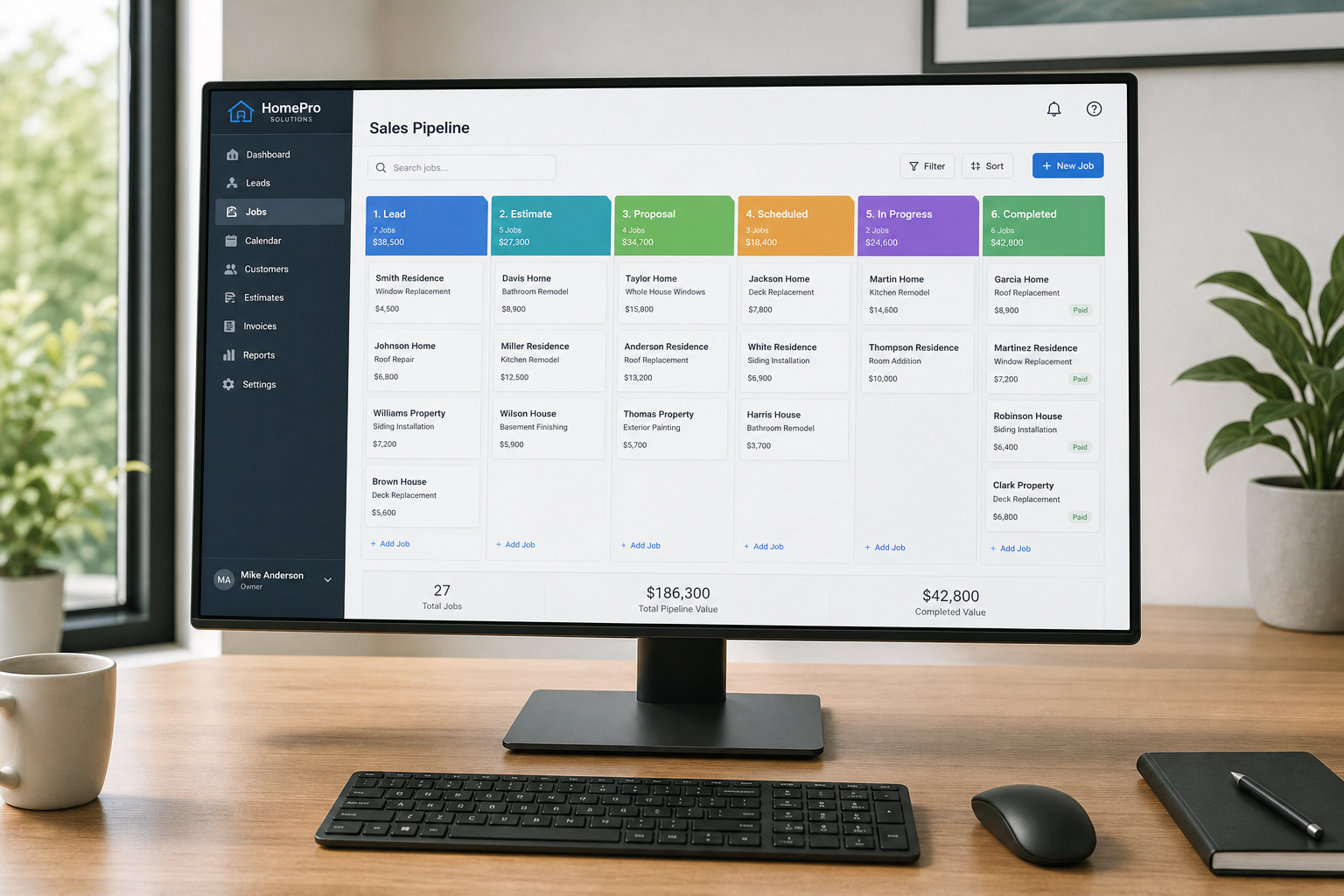
Sales pipeline software for home improvement turns a chaotic mix of spreadsheets, sticky notes, and disconnected apps into one shared system that tracks every job from the first phone call to the final payment. Instead of office staff, sales reps, estimators, and production crews each working from their own version of the truth, everyone looks at the same job record as it moves forward. This guide explains exactly what this software does, which features actually matter for roofing, siding, window, HVAC, and remodeling companies, what it costs, how to roll it out without losing momentum, and how a connected workflow like LeadFlow keeps every job moving without duplicate paperwork.
Quick answer: Sales pipeline software for home improvement is a workflow CRM (customer relationship management system) that tracks each lead through appointment setting, estimating, signatures, deposit collection, material ordering, and production so nothing falls through the cracks between the office and the field.
What Is Sales Pipeline Software for Home Improvement?
Sales pipeline software for home improvement is a system built specifically to move leads through defined stages — new lead, appointment set, estimate sent, signed, and in production — rather than treating them as a flat contact list. Unlike a generic address book, it ties each stage to real documents and actions, including estimates, electronic signatures, and payments.
In addition, this kind of software is usually structured around the exact sequence that roofing, siding, window, HVAC, and remodeling companies follow in the real world. For example, a lead does not simply become a "customer" in the system. Instead, it progresses through a scheduled appointment, a signed estimate, a production job, and a completed install, with each step visible to the right person at the right time. For a broader academic definition of how pipelines fit into the sales process generally, see Wikipedia's overview of sales process engineering.
Importantly, this is different from a sales pipeline template — a static spreadsheet with stage names typed into column headers. Software, by contrast, automates the movement between stages, timestamps every change, and connects documents directly to the job instead of leaving them scattered across email threads and shared drives.
Why Home Improvement Companies Need a Dedicated Sales Pipeline Tool
Home improvement sales cycles involve far more handoffs than a typical retail sale. A lead moves from marketing to a sales rep, then to an estimator, then to a production crew, and finally to billing. Therefore, a generic spreadsheet or a basic contact-management CRM often breaks down the moment more than one person needs to touch the same job.
According to research widely cited by HubSpot, organized CRM adoption is associated with sales productivity gains of up to 34 percent, largely because reps spend less time hunting for information and more time following up with prospects (HubSpot). For home improvement teams specifically, that time savings typically shows up as faster estimate turnaround and fewer missed follow-ups.
Meanwhile, the stakes for getting this right keep rising. The U.S. Census Bureau's construction spending data shows residential improvement spending remains a multi-billion-dollar category year over year, which means more leads, more competition, and less tolerance for a dropped follow-up or a lost estimate. As a result, a dedicated pipeline tool reduces duplicate data entry between office staff and the field. Consequently, fewer details get lost when a job changes hands from sales to production.
A visual pipeline view helps teams see exactly where every job stands.
Key Features of a Home Improvement CRM Pipeline
Not every pipeline tool is built the same way. Specifically, home improvement companies should look for features that match the full job lifecycle rather than just contact management.
- Lead and call queue management so new inquiries get assigned and followed up on quickly.
- Appointment scheduling connected directly to the lead record, not a separate calendar app.
- Online estimates with e-signatures (a legally recognized digital approval, instead of a wet-ink signature) so customers can approve a proposal from any device.
- Deposit and payment collection tied directly to the signed estimate.
- Automatic production handoff once a sale is recorded, so crews see new jobs without manual re-entry.
- Job-linked material ordering that keeps purchase orders tied to the correct job.
- A shared production job board, including a TV display option for the shop or office.
- Reporting on job costing and marketing performance across the full pipeline.
How a Job Moves Through the Pipeline, Step by Step
To illustrate how these features work together, here is how a typical job flows through a connected pipeline from first contact to final payment.
- Capture and qualify the lead. The lead enters the pipeline with contact details and project type, then gets assigned to a sales rep right away.
- Schedule the appointment. The rep books a visit directly from the lead record so the office can see the date without a separate call.
- Build and send the estimate. Photos, pricing, and terms attach to the job, and the customer signs electronically from any device.
- Collect the deposit and create the production job. Once signed and paid, the system can automatically generate the production job for the crew.
- Order materials and track milestones. Material orders link to the job, and progress shows on a shared production board.
- Collect final payment and review reports. After completion, final payment is recorded and job costing data feeds into reporting.

Connecting appointments and estimates keeps the sales pipeline moving without extra paperwork.
Sales Pipeline Software vs. Spreadsheets and Generic CRMs
Before switching tools, it helps to see the gap side by side. In particular, the difference becomes obvious once a job needs to pass between the sales team and the production crew.
| Capability | Spreadsheet | Generic CRM | Home Improvement Pipeline Software |
|---|---|---|---|
| Lead stage tracking | Manual, error-prone | Automated, generic stages | Automated, trade-specific stages |
| Estimates & e-signatures | Separate tool required | Often a paid add-on | Built in, linked to the job |
| Production handoff | Manual re-entry | Not supported | Automatic job creation |
| Material ordering link | No | No | Yes, tied to job record |
| Job costing reports | Manual calculations | Limited | Automatic, per stage |
Industry-Specific Pipeline Stage Templates by Trade
Although the core job lifecycle is similar across trades, the details differ enough that a one-size-fits-all pipeline rarely fits well. Below are examples of how pipeline stages typically get customized by trade.
- Roofing: Lead → Inspection scheduled → Estimate with insurance documentation → Signed → Material delivery → Install day → Final walkthrough.
- Siding and exteriors: Lead → Measure appointment → Material and color selection → Signed estimate → Production scheduled → Install → Punch list.
- Windows and doors: Lead → In-home consultation → Custom order quote → Signed → Manufacturing lead time tracked → Install → Final payment.
- HVAC: Lead → Diagnostic or estimate visit → Equipment proposal options → Signed → Permit pulled → Install → Service follow-up.
- Kitchen and bath remodeling: Lead → Design consultation → Scope and budget proposal → Signed contract → Material procurement → Phased production → Final inspection.
For companies managing more than sales, it is also worth reviewing a home improvement business management software guide, since the pipeline is only one part of running the full operation.
Must-Have Integrations for a Connected Pipeline
A pipeline tool that cannot talk to the rest of your tech stack simply creates a new silo. Consequently, check for native or easy connections to the tools below before committing.
- Accounting software such as QuickBooks, so invoices and job costing sync without double entry.
- Calendar tools like Google Calendar or Outlook, so appointments stay visible across the team.
- Text and call tracking, so every lead conversation is logged against the job record automatically.
- Financing providers, so homeowners can apply for payment plans directly from the estimate.
- Marketing and review platforms, so lead source data flows into reporting automatically.
How Much Does Sales Pipeline Software Cost?
Pricing for sales pipeline software for home improvement generally scales with the number of users and the depth of features included. Most vendors offer month-to-month plans rather than requiring long-term contracts, which lowers the risk of switching tools.
For example, LeadFlow structures its plans around team size: Starter supports up to 3 users, Pro supports up to 10, and Business supports up to 25. Enterprise plans are available for larger teams or companies operating across multiple locations. Every plan is month-to-month, and customers can cancel at any time.
In addition, onboarding is typically bundled in, covering account configuration, data migration from spreadsheets or a previous CRM, user setup, and live team training. Therefore, the upfront cost of switching tools is lower than it might first appear.
Calculating the ROI of a Connected Sales Pipeline
To justify the cost, it helps to run a simple calculation rather than relying on a vague sense that "it will help." For instance, if a company closes 20 jobs a month at an average ticket of $9,000, recovering just two additional closes per month through faster follow-up and fewer lost estimates adds $18,000 in monthly revenue — often more than the entire software cost for a year.
Similarly, time saved on manual data entry and status-update phone calls between sales and production compounds across every employee, every week, making the payback period for most teams measured in weeks rather than years.
Choosing the Right Sales Pipeline Tool for Your Team
When comparing options, it helps to map the tool against your actual process rather than a generic feature list. Specifically, ask whether the platform can connect estimates, payments, materials, and production around a single job record, or whether those pieces live in separate systems that require manual updates.
For a deeper comparison of CRM options built for this industry, see this guide on choosing the best CRM for home improvement companies. It is also worth reviewing how features, cost, and setup typically compare across vendors before committing to a plan.
Common Pipeline Management Mistakes to Avoid
Even with good software, a few mistakes tend to slow adoption. First, skipping team training often leads to staff reverting to spreadsheets within weeks. Second, failing to migrate historical leads and jobs can create gaps in reporting and customer history.
Similarly, configuring pipeline stages that do not match the company's actual sales process causes confusion rather than clarity. For a related look at fixing lead handling specifically, see this resource on streamlining lead management for home improvement companies.
According to the U.S. Small Business Administration, consistent follow-up processes are among the most common operational gaps for small service-based businesses. A structured pipeline directly addresses that gap by making follow-up visible rather than optional.
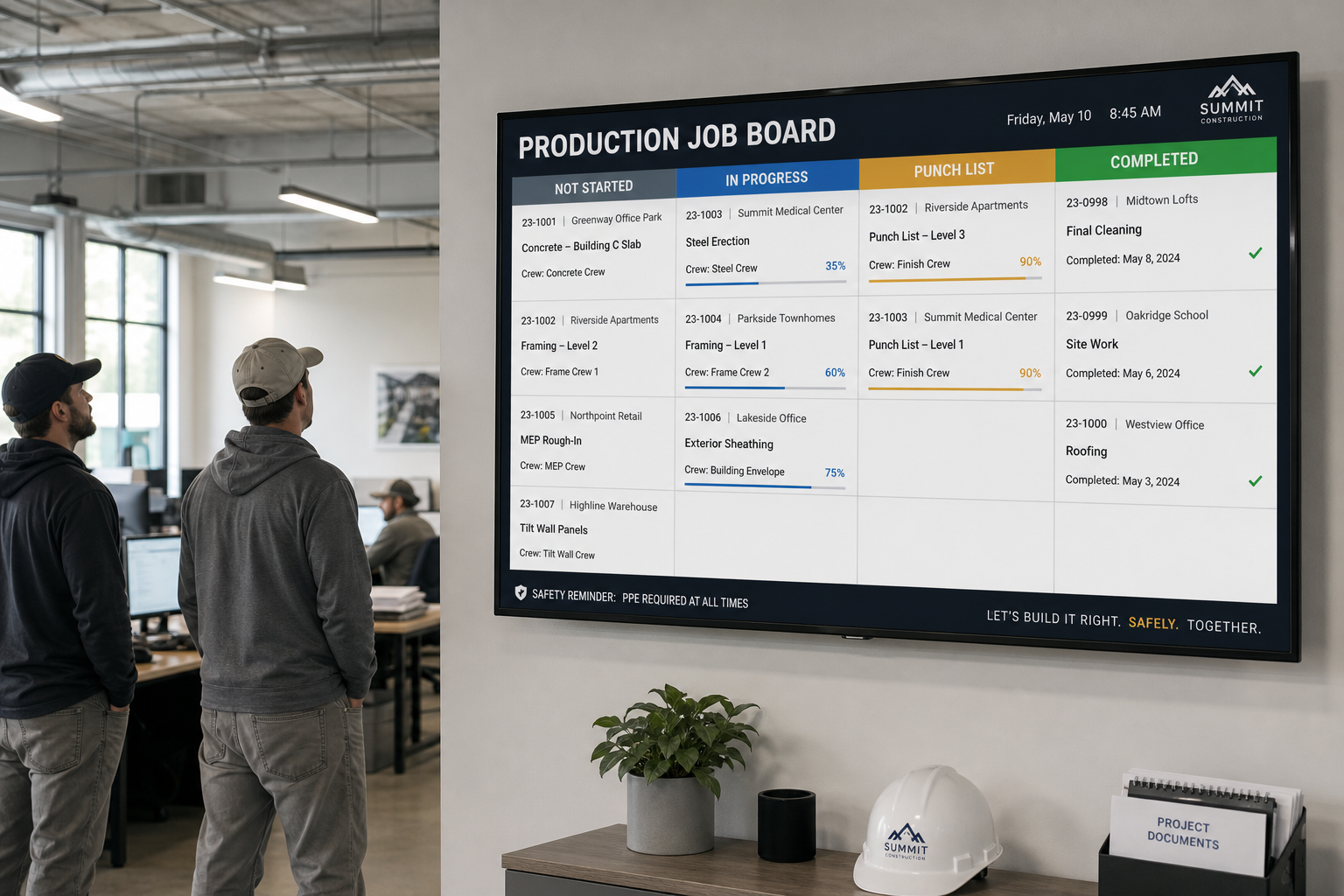
A shared job board keeps production crews aligned with the sales pipeline in real time.
What Reporting and Job Costing Should Include
Reporting is where a connected pipeline pays off most clearly. At minimum, reports should show conversion rates between pipeline stages, average time spent in each stage, job costing against estimates, and which marketing sources produce the most signed jobs.
Consequently, owners can see which stage of the process is slowing jobs down, whether that is slow estimate turnaround, delayed material orders, or production backlogs, and address it directly instead of guessing.
Mobile Access and Field Team Considerations
Because so much of the home improvement sales process happens on a homeowner's kitchen table or front porch, mobile access is not optional. Therefore, confirm that reps can build estimates, capture signatures, and take deposit payments from a phone or tablet without needing a laptop or office connection.
In addition, production crews benefit from mobile access to job notes, material lists, and photos, so questions get answered on-site instead of through a round of phone tag with the office.
Data Security and Privacy in Shared CRM Platforms
Because customer names, addresses, and payment information all pass through the pipeline, security deserves direct attention rather than an assumption. Reputable providers isolate each company's data into its own private workspace, encrypt data in transit, and restrict access by user role.
Before signing up with any vendor, it is reasonable to ask directly how customer data is isolated, whether payment processing is handled by a PCI-compliant partner, and what happens to your data if you ever cancel the account.
Implementation Timeline: What to Expect Week by Week
A realistic rollout timeline helps set expectations across the team. While every company differs, a typical onboarding generally follows this rhythm:
- Week 1: Account configuration, pipeline stage setup, and user roles.
- Week 2: Data migration from spreadsheets or a previous CRM, plus estimate template setup.
- Week 3: Live training sessions, broken out by role for office, sales, and production staff.
- Week 4 and beyond: Go-live with ongoing support as the team adjusts day-to-day habits.
Frequently Asked Questions About Sales Pipeline Software for Home Improvement
What is sales pipeline software for home improvement?
Sales pipeline software for home improvement is a system that tracks leads and jobs through every stage, from first contact to appointment, estimate, signed contract, and payment. It gives office staff and sales reps a shared view of where each opportunity stands.
How is a home improvement sales pipeline different from a generic CRM?
A generic CRM tracks contacts and deals, but a home improvement sales pipeline also connects estimates, signatures, material orders, and production scheduling to the same job record. This keeps sales and installation teams aligned instead of working from separate systems.
How much does sales pipeline software cost?
Pricing typically depends on the number of users and features included. LeadFlow, for example, offers month-to-month plans sized for teams of up to 3, 10, or 25 users, plus enterprise options for larger or multi-location companies.
Can existing leads and jobs be migrated into new pipeline software?
Yes, most modern platforms support migrating historical leads and active jobs from spreadsheets or a previous CRM during onboarding. This preserves job history so nothing gets lost during the switch.
What happens if a home improvement company's team grows?
A scalable pipeline platform lets a company move up to a higher user tier or an enterprise plan as headcount or locations increase, without rebuilding workflows from scratch.
Is company data kept private and secure in a shared platform?
Reputable providers give each company its own isolated, private workspace so data is never visible to other customers on the platform. It is worth confirming this directly with any vendor before signing up.
What is included in onboarding and setup?
Onboarding commonly includes account configuration, data migration, user and role setup, estimate templates, and live team training, helping a team start using the pipeline without a steep learning curve.
Can a pipeline tool connect estimates, payments, and production together?
Yes, connected platforms can turn a signed estimate into a production job automatically and link material orders to that same job record, removing the need to re-enter job details across separate tools.
What reporting capabilities should a home improvement pipeline include?
Useful reporting covers pipeline conversion rates, job costing, production milestones, and marketing source performance, helping owners see which stages are slowing jobs down.
What training and launch support should a company expect?
Expect live training sessions for office, sales, and production staff during rollout, along with ongoing support after launch. Training that covers each role separately tends to produce faster adoption.
Can the workflow be reviewed before booking a demo?
Many vendors, including LeadFlow, will walk through how a company's current process maps onto the platform before any commitment is made, which helps confirm fit ahead of a formal demo.
What is the typical cancellation policy for this type of software?
Month-to-month plans without long-term contracts allow a company to cancel at any time rather than being locked into an annual agreement, which lowers the risk of trying a new pipeline tool.
Does sales pipeline software support multiple locations?
Enterprise-level plans are generally built to support multiple locations or teams larger than 25 users under one account structure, while still sharing pipeline stages and reporting.
What are common mistakes companies make when adopting pipeline software?
Common mistakes include skipping team training, failing to migrate historical job data, and not configuring pipeline stages to match the actual sales process, any of which can slow adoption.
How long does it take to set up sales pipeline software?
Setup timelines vary, but a guided onboarding process with configuration, migration, and training can typically be completed within a few weeks. Complex migrations from multiple spreadsheets may take longer.
Does sales pipeline software integrate with accounting tools like QuickBooks?
Many platforms connect with accounting software so job costing and payment data sync automatically, which avoids double entry between the pipeline and the books.
Is there a mobile app for sales reps and crews in the field?
Most modern platforms offer mobile access so reps can build estimates and collect signatures on-site, while crews can view job notes and material lists from a phone or tablet.
Bringing It All Together
In summary, sales pipeline software for home improvement companies works best when it connects every stage of a job rather than tracking leads in isolation. From the first call through appointments, estimates, signatures, payments, material orders, and production, a connected workflow reduces duplicate entry and keeps office, sales, and field teams working from the same information.
For companies evaluating options, it helps to review a broader comparison of project management software alongside pipeline-specific tools before making a decision. Ultimately, the right sales pipeline software for home improvement should fit how a team already works, support growth as the business adds users or locations, and come with the setup and training needed to get the whole team using it from day one. Teams ready to see how a connected workflow would map onto their own process can book a personalized workflow demo to walk through it directly.
