Home Improvement CRM Guide: Features, Cost & Setup
A home improvement CRM connects leads, estimates, payments, and production in one system. See how LeadFlow works and book your free workflow demo today.
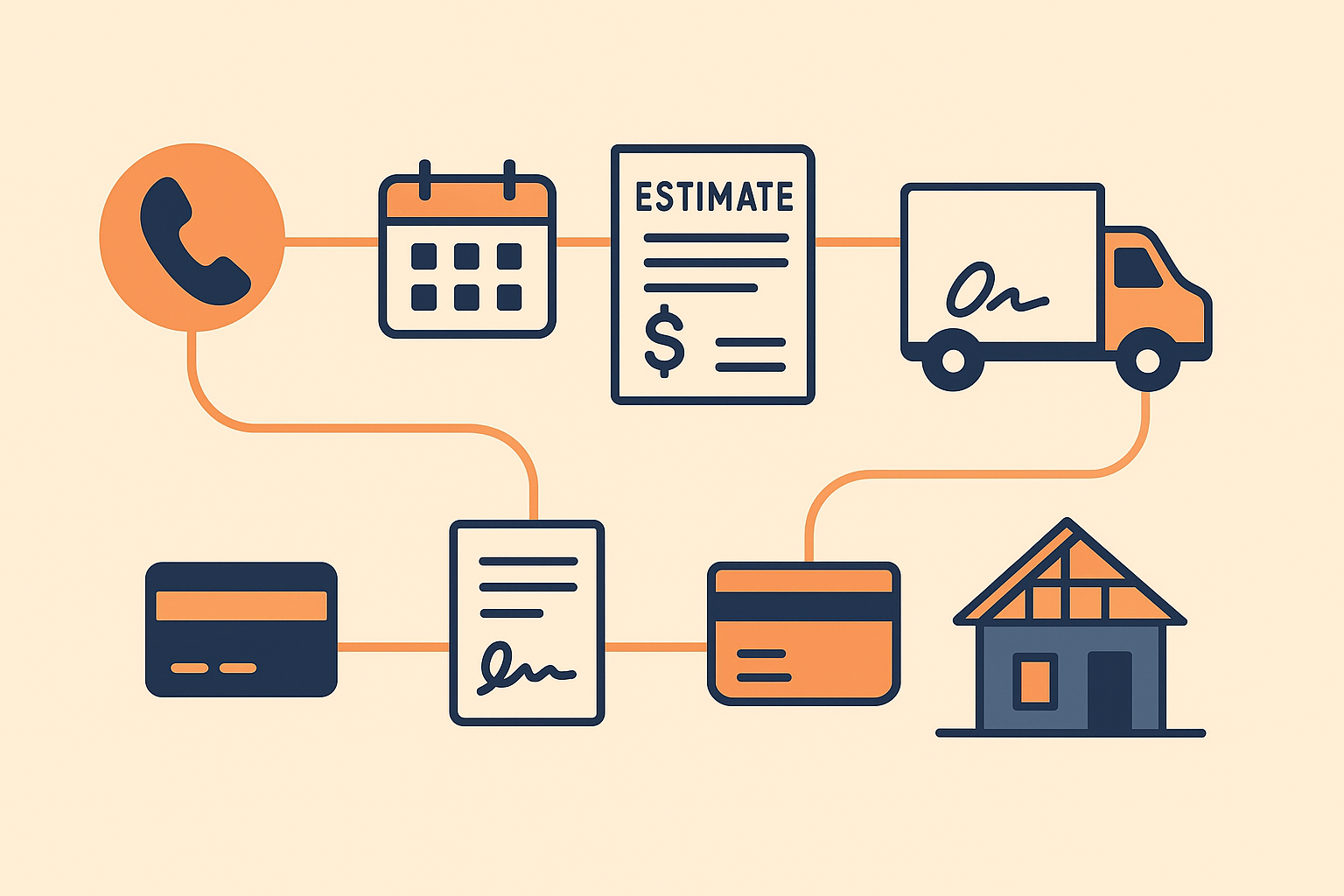
A home improvement CRM is a software system that connects lead management, appointments, estimates, signatures, payments, material orders, and production into a single workflow built specifically for contractors. Instead of juggling spreadsheets, sticky notes, and disconnected apps, your office staff, sales reps, and production crews work from the same job record from the very first phone call. For growing remodeling, roofing, siding, or window companies, that single connection is often the difference between a job that moves smoothly to completion and one that stalls between departments. In this guide, you'll learn exactly what a home improvement CRM does, which features separate a true contractor platform from a generic sales tool, how pricing typically works, and how a connected system keeps every job moving from the first call through final payment.
What Is a Home Improvement CRM, Exactly?
A home improvement CRM is customer relationship management software (a system for tracking customer interactions and data) built around the specific stages of a remodeling, roofing, or installation business. Unlike generic sales software, it recognizes that a home improvement job moves through distinct phases: a lead call, an in-home appointment, an estimate, a signed contract, a deposit, material ordering, production, and a final payment.
Because of that structure, a home improvement CRM typically includes calendars for appointment scheduling, templates for estimates, e-signature tools, payment processing, and a production board that crews can check without calling the office. As a result, information that sales enters during the estimate carries forward automatically when production begins, which cuts down on duplicate data entry. For example, LeadFlow can automatically create a production job the moment a sale is recorded, so the crew sees the job without anyone retyping details. For a closer look at how lead data flows through a connected system, see this overview of lead management and call queues.
Home Improvement CRM vs. Generic Sales CRM
A generic sales CRM assumes a single, linear pipeline — new lead, qualified, proposal, closed. A home improvement CRM, by contrast, is purpose-built for a physical job: it needs a calendar for in-home visits, a way to attach measurements and photos to an estimate, e-signature capture on-site, and a production board that a crew leader can glance at from a job site. Consequently, companies that try to force a general CRM into a contracting workflow usually end up bolting on spreadsheets anyway, which defeats the purpose of buying software in the first place.
A home improvement CRM keeps every job stage connected, from the first call to the final install.
Why Home Improvement Companies Need a Connected Workflow
Many home improvement companies start with a mix of spreadsheets, paper estimates, and a separate accounting tool. That approach works for a solo operator, but it breaks down quickly as a team grows. Office staff lose track of which jobs are signed, sales reps forget to follow up on open estimates, and crews show up without knowing what materials were ordered.
In addition, disconnected systems make it hard to see where a job actually stands. A 2018 FMI and PlanGrid construction productivity study found that construction professionals spend close to a third of their time on activities that do not move a project forward, including searching for information and resolving conflicts caused by missing data. Similarly, the U.S. Small Business Administration notes that administrative overhead is a common barrier to scaling a small business without adding unnecessary headcount. That's one reason so many home improvement companies look for software that connects daily operations instead of adding another standalone tool.
A connected home improvement CRM addresses this directly. Specifically, it keeps the same job record visible to office staff, sales representatives, and production crews, so a status update made in one place shows up everywhere else — no phone tag required.
Home Improvement CRM vs. Generic CRM vs. Spreadsheets
Before switching systems, it helps to see the three options side by side. The table below compares how each approach actually handles a typical job.
| Capability | Spreadsheets | Generic CRM | Home Improvement CRM |
|---|---|---|---|
| Job-specific estimate templates | Manual | Rare | Built in |
| Automatic sale-to-production handoff | No | Usually not | Yes |
| Job-linked material ordering | No | No | Yes |
| Field-ready mobile access | Limited | Varies | Yes |
| Job costing & profitability reports | Manual | Generic | Trade-specific |
As the table shows, spreadsheets and generic CRMs can handle a piece of the puzzle, but neither was designed around the full life cycle of a home improvement job. That gap is exactly what a purpose-built platform closes.
Core Features of the Best CRM for Home Improvement Contractors
Not every CRM is built for contracting work. Therefore, it helps to check for the features that actually matter to a home improvement operation:
- Lead and call queue management — so every incoming call or form submission gets tracked and followed up on.
- Appointment scheduling — a shared calendar for sales visits that the whole office can see.
- Estimates and e-signatures — templates, photos, and digital signing to speed up contract approval.
- Deposits and payments — payment collection tied directly to the job file.
- Material ordering — orders emailed out and connected to the relevant job.
- Production board and milestones — including a TV job board crews can check on-site.
- Marketing and lead-source tracking — so you know which channels actually produce signed jobs.
- Financing integration — connect approved financing offers to an estimate so homeowners can choose a payment plan without leaving the job file.
- Reporting — job costing and performance data across the whole operation.
LeadFlow includes all of these in one workspace. You can preview how the sales side works in this interactive product tour, or review how a home improvement company used a connected workflow in these case studies. If offering homeowner financing is part of your sales process, it's also worth understanding basic disclosure expectations outlined by the Consumer Financial Protection Bureau before building financing options into your workflow.
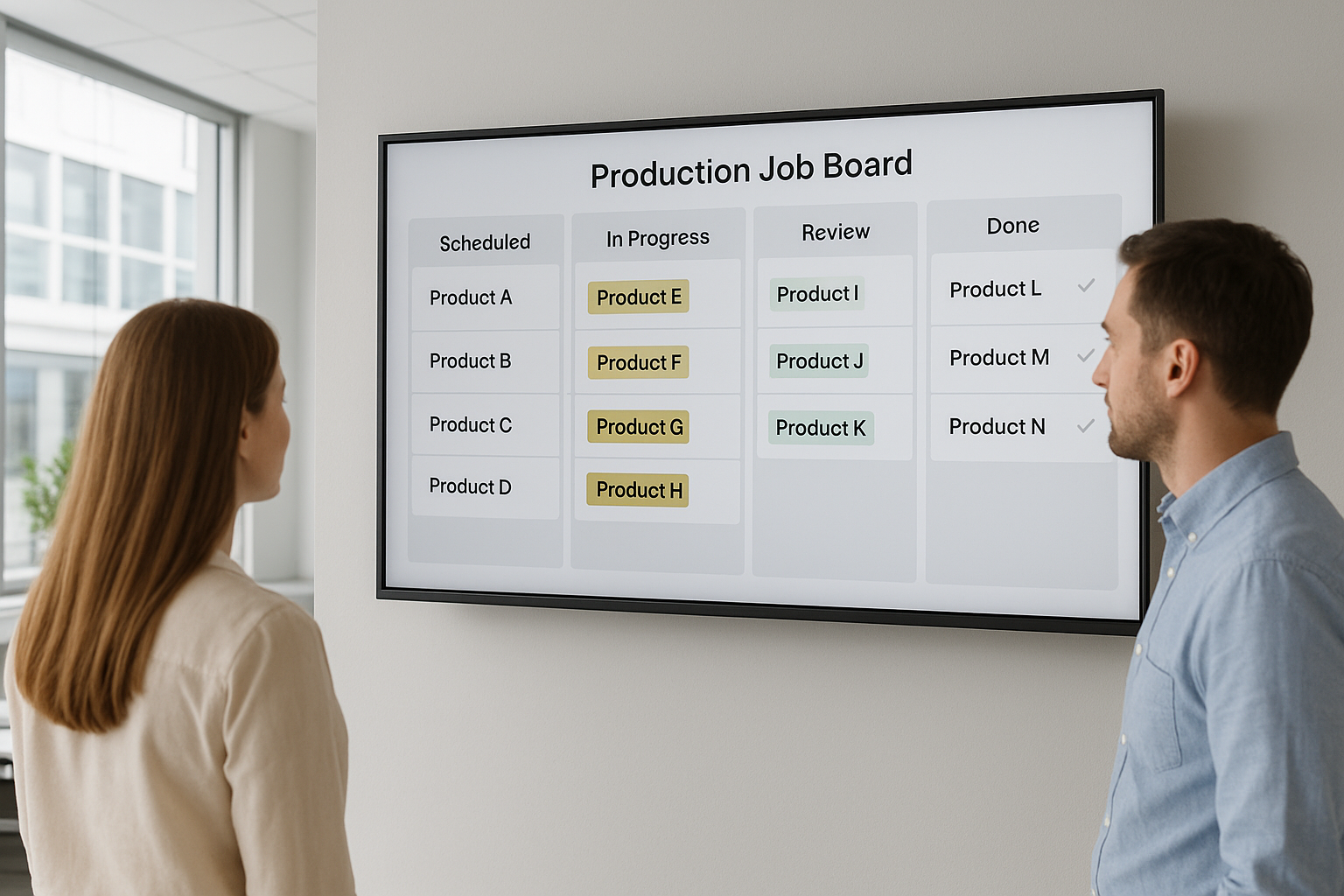
A TV job board keeps production milestones visible to the whole office.
How a Connected System Moves a Job From Call to Final Payment
Here is the typical sequence a connected home improvement CRM follows for a single job:
- Capture and qualify the lead. When a prospect calls or submits a form, the system logs the contact and routes it into a call queue so a sales rep can follow up without digging through email or notes.
- Schedule the in-home appointment. A sales rep books an appointment on the shared calendar, and the office can see scheduled visits without a separate phone call or text message.
- Build the estimate and collect a signature. The rep builds an estimate from templates, attaches photos, and collects an electronic signature on site instead of mailing paperwork back and forth.
- Collect the deposit and record the sale. Once the contract is signed, the deposit is collected through the platform and the sale is recorded against the same job file.
- Generate the production job automatically. Recording the sale automatically creates a production job, so the production team sees the new job without anyone retyping details.
- Order materials and track milestones. Material orders are emailed out and linked to the job, while a production board and milestone tracking keep the crew and office aligned.
- Collect final payment and report on the job. After installation, the final payment is collected against the same job record, and reporting shows job costs and timelines.

Job-linked material orders help crews arrive with exactly what a project needs.
A Home Improvement CRM Built for Every Trade
Not every contracting business sells the same way, which is why the best home improvement CRM software flexes to match the trade instead of forcing one rigid pipeline on every company.
Roofing Companies
Roofing jobs often move fast, especially after storm damage. A connected CRM lets reps build estimates on-site, attach roof photos, and push an approved job straight to production the same day.
Siding and Window Replacement Companies
Siding and window companies usually sell on a longer, consultative cycle with multiple touchpoints. A home improvement CRM keeps follow-up tasks visible so no estimate quietly goes cold.
Kitchen and Bath Remodeling Companies
Remodeling projects involve multiple milestones — demo, rough-in, finish work — each with its own material order. A production board with milestone tracking keeps these longer jobs from slipping through the cracks.
Solar and General Home Improvement Companies
Solar and multi-service companies often juggle financing paperwork alongside installation scheduling. Because a connected CRM centralizes financing status, contracts, and production dates, nothing falls to a side conversation that never makes it back into the job file.
Marketing and Lead Source Tracking for Home Improvement Companies
Beyond managing jobs already in motion, a home improvement CRM platform should also tell you where your best leads actually come from. For example, tagging each lead with its source — a Google ad, a referral, a home show, or a direct mail piece — lets you see which channel produces signed contracts rather than just phone calls.
In turn, that visibility makes it far easier to cut spend on channels that generate unqualified calls and reinvest in the ones that close. According to U.S. Census Bureau construction spending data, residential improvement spending remains a significant and competitive category, which makes accurate lead-source reporting even more valuable for companies trying to win market share efficiently.
QuickBooks Integration and Accounting Sync
Most home improvement companies already run their books through QuickBooks or a similar accounting platform. Rather than re-entering every invoice and payment by hand, a connected CRM for home improvement contractors should sync job revenue and payments directly to your accounting software, which eliminates duplicate bookkeeping and reduces the chance of mismatched numbers between sales and finance.
Mobile Access for Field Sales and Production Crews
A home improvement CRM is only as useful as what a rep can do standing in a homeowner's driveway. Mobile access should let a sales rep build an estimate, capture a signature, and collect a deposit without returning to the office. Likewise, crew leads benefit from checking job status and material delivery details from a phone on-site instead of calling dispatch for an update.
Choosing Workflow Software for Your Home Improvement Business
Team size is often the first factor to consider. A solo operator or small crew may only need a handful of user seats, while a busy office with multiple sales reps and a production team needs more. For instance, LeadFlow's Starter plan supports up to 3 users, Pro supports up to 10, and Business supports up to 25, with Enterprise plans available for larger teams or companies running multiple locations.
Beyond user counts, it is worth asking how the platform handles the handoff between sales and production, whether it supports job-linked material ordering, and whether it is recognized by groups serving the remodeling industry, such as the National Association of the Remodeling Industry, as a standard part of running a contracting business. Each company should also receive its own isolated, private workspace rather than sharing data space with other businesses. You can explore the full feature set on the LeadFlow homepage before scheduling a walkthrough.
Home Improvement CRM Pricing and Plans
Cost is naturally one of the first questions companies ask. Plans for a home improvement CRM are often structured month-to-month rather than tied to a long-term contract, which means a company can cancel at any time if the fit is not right. LeadFlow follows this model across its Starter, Pro, Business, and Enterprise tiers, and full details are available on the pricing page.
Beyond the monthly fee, it helps to ask what is included in setup. Onboarding can include account configuration, migrating existing leads and jobs from spreadsheets or a previous CRM, user setup, and live team training, so the switch does not create a gap in day-to-day operations.
Data Security and Privacy in a Home Improvement CRM
Because a home improvement CRM stores customer names, addresses, contract values, and payment details, data isolation matters just as much as features. Reputable platforms give each company its own private workspace rather than mixing customer records across multiple businesses on shared tables. It's reasonable to ask any vendor directly how they isolate tenant data, and general best-practice guidance from agencies like the Cybersecurity and Infrastructure Security Agency is a useful baseline when evaluating any vendor's security posture.
Common Mistakes When Adopting a CRM for Home Improvement Companies
Switching systems rarely fails because of the software itself. Instead, it usually fails because of how the switch is handled. One common mistake is skipping data migration and starting fresh, which leaves historical job and customer information behind. Another is training only the office team and leaving sales reps or production crews to figure things out on their own.
A third mistake is adopting a generic setup instead of configuring the workflow to match how the company actually operates. Consequently, the best approach is to review the current process from first call to final payment, migrate existing data, and train every team involved before going live.
A Simple Checklist Before You Switch
- Map your current process from first call to final payment before touching any software.
- Export existing leads and jobs so nothing historical gets left behind.
- Schedule training for office, sales, and production — not just the office team.
- Set a go-live date and run both systems briefly in parallel if possible.
You can start that review with LeadFlow's own home improvement CRM overview before booking a personalized demo.
Frequently Asked Questions About Home Improvement CRM
What is a home improvement CRM?
A home improvement CRM is software that connects lead management, scheduling, estimates, signatures, payments, materials, and production into one workflow built for contractors. It replaces disconnected spreadsheets and apps with a single job record that office, sales, and production teams can all see.
How does a home improvement CRM differ from general CRM software?
General CRM software is built for broad sales pipelines, while a home improvement CRM is structured around the specific stages of a remodeling or installation job, including estimates, material orders, and production handoffs. That structure means less manual customization to fit a contracting workflow.
How much does a home improvement CRM cost?
Pricing typically depends on the number of users and features included, and plans are often offered month-to-month rather than as long-term contracts. LeadFlow's Starter, Pro, Business, and Enterprise plans scale from a few users to larger multi-location teams, with current pricing listed on its pricing page.
How long does it take to set up a home improvement CRM?
Setup time varies based on how much existing data needs to be migrated and how many users need training, but done-for-you onboarding can shorten the process considerably. Onboarding commonly includes account configuration, data migration, user setup, and live team training.
Can a home improvement CRM replace spreadsheets?
Yes, most companies move away from spreadsheets once leads, estimates, and production milestones live in a connected system instead of separate files. This reduces duplicate entry and keeps everyone looking at the same up-to-date job status.
What features should a home improvement CRM include?
Look for lead and call queue management, appointment scheduling, estimate templates, e-signatures, payment collection, material ordering, a production board, marketing attribution, and reporting. Together, these features cover a job from the first call through final payment.
Can existing leads and jobs be migrated into a new CRM?
Yes, existing leads and jobs can typically be migrated from spreadsheets or a previous CRM as part of onboarding. This avoids starting from zero and keeps historical customer data available after the switch.
What common mistakes do companies make when adopting a CRM?
The most common mistakes include skipping data migration, not training the full team including production crews, and failing to configure the workflow to match how the company actually operates. Avoiding these mistakes usually comes down to using guided onboarding instead of a self-serve setup.
Is company data secure in a home improvement CRM?
Reputable platforms give each company an isolated, private workspace so one company's data is not mixed with another's. It is reasonable to ask any vendor directly about their specific data isolation and security practices before signing up.
Can a home improvement CRM scale with a growing team?
Yes, most platforms offer tiered plans, so a company can move from a small team plan to a larger plan as headcount grows. Enterprise-level plans are generally available for larger teams or companies operating across multiple locations.
What training is included when onboarding a CRM?
Many vendors include live team training as part of onboarding, alongside account configuration and user setup. This helps office staff, sales reps, and production crews all learn the same workflow at the same time.
Does a home improvement CRM help with job costing and reporting?
Yes, connecting estimates, materials, and production to the same job record makes it possible to report on job costs and overall performance. Reporting across the operation is one of the main reasons companies move away from disconnected spreadsheets.
Can a home improvement CRM connect materials ordering to production?
Yes, in a connected system, material orders can be emailed out and linked directly to the relevant job, so production crews see exactly what was ordered for their project. This reduces the back-and-forth between the office and the field.
What is the best practice for choosing a CRM for home improvement contractors?
Start by mapping the company's current process from first call to final payment, then compare that process against what each CRM actually automates. It also helps to review real case studies or request a personalized demo based on the company's own workflow.
Is there a long-term contract required for a home improvement CRM?
Not necessarily. LeadFlow, for example, is offered month-to-month, and customers can cancel at any time rather than being locked into a long-term contract.
Does a home improvement CRM integrate with QuickBooks or accounting software?
Many home improvement CRM platforms sync job revenue and payments with QuickBooks or similar accounting software, which removes the need to re-enter the same numbers twice between sales and bookkeeping.
Can a home improvement CRM track which marketing channels generate the best leads?
Yes, tagging leads by source — such as paid ads, referrals, or direct mail — lets a company see which channels actually produce signed jobs rather than just phone calls, making future marketing spend more efficient.
Is a home improvement CRM useful for roofing, siding, or solar companies specifically?
Yes, roofing, siding, window, remodeling, and solar companies all benefit from the same core workflow, even though each trade sells on a different timeline. A flexible home improvement CRM adapts the pipeline to match how each trade actually closes jobs.
Final Thoughts
Choosing a home improvement CRM ultimately comes down to one question: does it connect your team's actual workflow, from the first call to the final payment, without adding more administrative work along the way? A connected system links leads, appointments, estimates, signatures, payments, material orders, production, marketing attribution, and reporting around the same job, which keeps office staff, sales reps, and crews working from one source of truth instead of scattered tools.
LeadFlow is built specifically for home improvement companies that need this kind of connected workflow, with month-to-month plans, guided onboarding, and live training included. Visit leadflowcrm.info to tell the team how a job gets handled today and book a personalized workflow demo to see it connected end to end.